

Are you looking to embed an iorad tutorial into a PowerPoint or Google Slide presentation?
When you share a presentation with your learners, you want them to have the most efficient way to access all of their resources in one spot. That's why it would be great if the tutorials you wanted to include could be embedded directly in the presentation itself.
Unfortunately, it's not possible out-of-the-box in either PowerPoint or Google Slides presentation software.
However, there is a workaround for Microsoft PowerPoint. As for Google Slides, we offer some options for embedding.
Embed in PowerPoint
- Copy the URL of the tutorial you want to embed.
- Download the free trial of iSpring Converter Pro.
- Open PowerPoint and click the iSpring Converter Pro 9 tab.
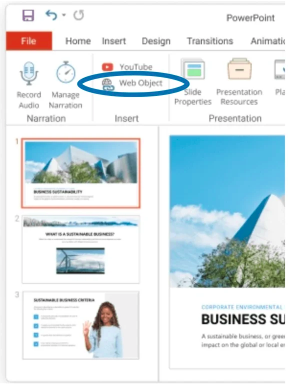
- Then simply paste the copied URL in the open window.
As for embedding within Google Slides...
Unfortunately, Google limits the use of an iframe; however, you can insert YouTube videos, MP4 files, images, & GIFs.
What you can do is upload an MP4 or hyperlink an image or GIF within your presentation.
You could also use a screenshot of the tutorial cover as your image or design an image of your own.
To create a GIF you can export the tutorial as an MP4 and then use EZgif.com to generate a GIF to hyperlink to the interactive tutorial.
See how to upload an MP4, hyperlink or GIF, and even how to create a GIF out of your iorad tutorial, see the following tutorials: