
Purpose of this document
This document is intended for enterprise IT, Security, Compliance, and Architecture teams evaluating the iorad browser extension. It outlines how the extension functions, its security model, what permissions it requests, how data is handled, and the controls and certifications in place to support its safe use in regulated and security-sensitive environments.
Our recommendation is to share this security overview with your IT team right away so they can begin their review. Browser extensions are sometimes blocked by default in enterprise environments, and early approval ensures your team can start a trial without unnecessary delays.
1. What the iorad browser extension is
The iorad Capture Extension enables users to generate step-by-step tutorials by capturing interactions on any website. Its single goal is to streamline the documentation process by turning user actions into structured, shareable walkthroughs in seconds.
It is a user-initiated capture tool available in the Chrome Web Store, Microsoft Edge Add-ons, and Firefox Add-ons Store. The extension does not monitor, analyze, or passively collect browser activity. It only runs during active, user-initiated sessions and never gathers background data, open tabs, cookies, or network activity.
2. How it works
Capture: Users record clicks, inputs, and navigation steps on any webpage
Generate: The extension automatically converts these actions into a visual tutorial with screenshots and annotations
Publish or Share: Tutorials are saved to the user’s iorad account and can be edited, embedded, or shared
Everything is built to reduce time-to-documentation from hours to minutes.
3. What the extension captures
When a user starts a recording session, the extension may collect:
-
Screenshots of the active browser tab
-
Mouse clicks, keystrokes, and scrolling needed to document the process
-
DOM element metadata (such as ID or class) to label elements automatically
-
Instructional content added by the user
Capture is limited to the browser tab and occurs only during an active session.
4. What the extension does not capture
The extension does not:
-
Access cookies, tokens, session storage, or backend application data
-
Monitor browser activity in the background or between sessions
-
Scrape data, capture API responses, or observe user behavior across tabs
-
Include telemetry or persistent monitoring components
Everything captured is part of a user-controlled tutorial session.
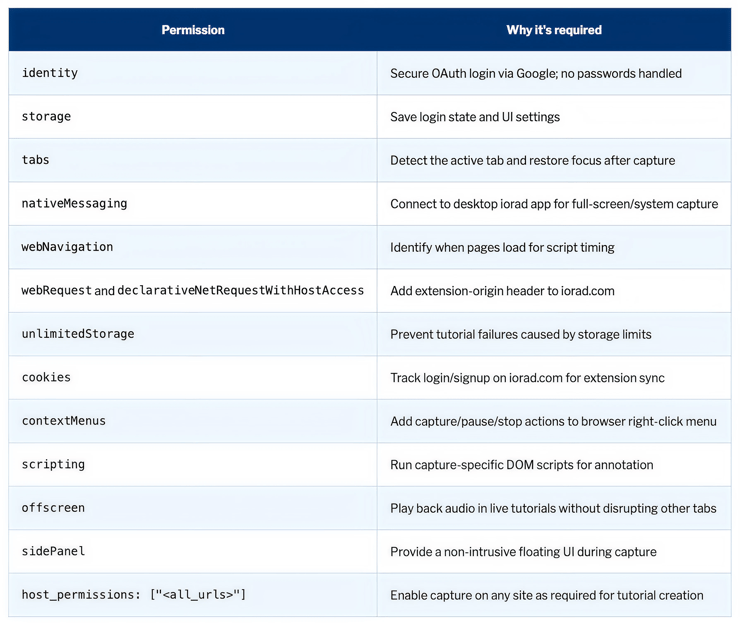
5. Why permissions are needed
Each browser permission supports a specific feature and is strictly scoped to the extension’s function.
6. Data handling
What is collected
-
Email address for authentication (via OAuth)
-
OAuth tokens securely handled by Google
-
Clicks, keystrokes, and screenshots during active tutorial creation
-
On-screen page content that the user chooses to capture
What is not collected
-
Health, financial, or personal data unless shown during a tutorial
-
Browser history, system-level information, or real-time behavior
-
Content from non-active tabs or background pages
-
Any telemetry or analytics data outside of explicit capture events
Where data is sent
-
To iorad: Tutorial content is uploaded to your account after capture
-
To Google: OAuth authentication requests are securely exchanged
-
Nowhere else: Data is not shared, sold, or transmitted to third parties
7. Data flow and storage
During capture
All tutorial data remains local in the browser until the user completes and saves it.
When saved
Data is encrypted in transit and at rest using:
-
TLS 1.2 or higher during upload
-
AES-256 encryption at rest
-
Google Cloud Platform with ISO 27001, SOC 1, SOC 2, and SOC 3 certifications
Each customer account is isolated with role-based access and audit logging.
8. Security architecture
iorad follows a secure-by-design framework including:
-
SOC 2 Type 2 certified controls
-
Annual third-party penetration testing
-
Secure SDLC practices and version-controlled deployments
-
Role-based access control (RBAC) with least privilege enforcement
-
Centralized logging with 24/7 monitoring
-
Encryption key management via Google Cloud KMS
-
No use of customer data for machine learning or AI training
9. Compliance and regulatory alignment
iorad meets and supports compliance for:
-
SOC 2 Type 2
-
GDPR and CCPA privacy frameworks
-
FERPA, COPPA, and student data protections
-
WCAG 2.1 AA accessibility
-
Data Processing Agreements (DPA) and custom DPIAs upon request
-
Full transparency into subprocessor usage and data flows
10. Incident response and business continuity
-
Documented Incident Response Plan with notification timelines
-
Annual testing of Business Continuity and Disaster Recovery Plans
-
RTO of 4 hours and RPO of 24 hours or less for core services
-
High availability and redundancy with uptime exceeding 99.9 percent
11. Deployment and IT controls
iorad supports secure and scalable deployment options:
-
Install via Chrome, Edge, and Firefox extension stores
-
Mass deploy using Group Policy (GPO), Jamf, Intune, or other MDM tools
-
Restrict usage by domain, IP, or allowlist policies
-
Track usage and content creation with enterprise audit logs
-
Provide onboarding materials and IT support documentation
12. Summary for security reviewers
-
Extension runs only when users initiate capture
-
Captures only screen content and inputs, not system or browser-level data
-
Provides redaction tools and full user control of content
-
Encrypts data in transit and at rest with enterprise-grade security
-
Maintains SOC 2 Type 2 certification and regulatory compliance
-
Does not use or repurpose customer data outside tutorial creation
-
Permissions are narrowly scoped and justified
Additional documentation and resources
Available upon request or during onboarding:
-
SOC 2 Type 2 Report
-
Network and Data Flow Diagrams
-
Extension Permission Matrix
-
Application Security Architecture Overview
-
Security Whitepaper
-
SDLC and Change Logs
-
Penetration Test Summary
-
DPA and Subprocessor List
-
DPIA Template
-
Incident Response and BCP Plans
-
Student Privacy and Accessibility Policies