
Learning & Development and Enablement teams face a consistent problem: how to get people doing things the right way. This task is easier with certain tools that make allow users to visualize and interact with your product. The right tool can replace your entire FAQ section, saving time needed to write (and update) paragraphs of text, and minutes spent responding to emails, messages and queries.
But this rests on finding the right tool - one that suits the needs of you and your targets. And there are many tools on the market.
This guide helps fine-tune your search, by highlighting similar tools and showing how they stack up across categories and use cases. In the following paragraphs, we’ll explore Arcade and iorad, exploring their features and how they track across the metrics that are most important. With this guide, choosing the best tool for you and your team is a much quicker and more structured process.
Who this guide is for
This guide is for:
-
L&D, Management, and Enablement teams
-
Working in High-Competition Industries
-
Need a tool for internal trainin,g and customer success enablement
-
Trying to cut down on time spent writing or formatting FAQs and messages; and
-
Trying to capture and reflect real product usage
And need a tool that’s exactly right for them.
What is the Problem?
Customers need to use your product or service. And teams need to know how to provide the service or keep the product running efficiently. But most will come in with limited knowledge on how anything works. For many users, knowing how to use and integrate what you’re offering is a prerequisite to buying.
Teams approach these in different ways
- Product-focused Marketing
- Training documents and PDFs
- FAQ pages explaining processes and uses
- Entire teams dedicated to answering complaints and responding to requests
But all of these can be rather inefficient. It’s much easier to simply show how to use your product than respond to a chain of emails. It’s more often not about what is being taught but how.
What both tools do well
Arcade and iorad help solve the problem of customer enablement with simple guides that simulate using your product and answer users’ questions. Easy-to-make guides that show and tell users what to do, how, and where. No need for mountains of texts, email chains stretching into forever, or thousands of screenshots and videos. Just simple, repeatable guides, generated directly from your product.
With both tools, you can:
- Showcase products with content captured automatically from the product itself
- Turn features into reusable knowledge assets
- Save time spent mapping out processes and on manual documentation
- Share guides with users, customers, teammates, and learners
If you need to create a quick product demo or answer a single customer query, both tools will get you sorted in no time.
The difference is in how they approach learning and training. If you need the odd demo every now and again, you probably won't notice much.
But as you scale, onboard new customers, and expand your features, the tools at your disposal can either push you closer to your targets or slow you down.
Where Arcade fits the bill
Arcade is an interactive product demo platform designed to help teams create clickable, self-guided walkthroughs of their product without requiring a live environment. It creates interactive demos with visual storytelling in minutes. It focuses on exploration, meaning customers can experience your product and its features in a simulated environment. With Arcade, you can, literally, let your product do the talking.
Arcade is great if you:
- Want to maximize visual storytelling and engagement
- Need interactive product demos for prospects
- Want to cut down on time spent explaining features
It's like the tutorial stage of a game. It shows you much of what to expect and lets you get the hang of the game and some of its features before you start the campaign. Arcade is built to mirror your product so users can interact safely and get familiar.
Where iorad stands out
While Arcade focuses on interactive product demos, iorad is an all-round training platform that allows users to create interactive tutorials. It takes the user through the workflow process, building familiarity and repeatability.
If your training needs to be precise, accurate, and directed, iorad is the tool for you.
iorad is especially suitable for:
- Teams that are responsible for onboarding, upskilling, and rolling out complex tools
- Teams that need training to be guided, focused and specific
- Support teams who want to create interactive help content that reduces tickets and empowers users
- IT and operations teams who need to standardize workflows across departments without constant retraining
- Anyone managing high-change environments where processes evolve often, and documentation needs to stay up to date
iorad tutorials are interactive, highly customizable, and suitable for various processes. With outputs across various formats, including embedding into your LMS, knowledge base, and your actual software, iorad tutorials make expert-level knowledge easy to create and access. And its ease of updating makes keeping your tools and employees up-to-date convenient and quick.
If training needs to scale with your organization and learning needs to be as efficient as it is fast, iorad is the better long-term solution.
Here's an interactive tutorial
** Best experienced in Full Screen (click the icon in the top right corner before you begin) **iorad is interactive and can be clicked through in real time.
iorad vs. Arcade: 4 key differences to note
Both tools have similar offerings and focus on solving the learning and useability problem. But how they solve these problems are different. They handle interactivity, guidance, delivery and scale in different ways. Here’s how the tools perform across selected metrics.
1. Product Experience Simulation
Arcade focuses on replicating the feeling of using the product. It creates an environment identical to using your product, allowing users to explore, branch out, and experiment. This is especially good if the aim is to simply familiarize customers with the product and develop first impressions.
iorad is more constrained, focused on instructional learning. It sets out a step-by-step process to complete a given task. It allows users to see and complete the process, but its emphasis on correctness can limit users’ flexibility and exploration.
Winner: Arcade — Arcade gives users, especially prospects, more freedom and realism in engaging with your product.
2. Learning and Retention
Arcade gives users the freedom to experience your product with limited input or interference. Users can skip steps or branch out frequently. This means users can know your product and various features, but not necessarily know how to complete them.
iorad is learning-focused and uses predefined steps to show users how to complete processes. Its structured approach reinforces learning progression and retention. Users get a guided tour of your product. They see processes AND practice them, building muscle memory.
Winner: iorad — Arcade informs, iorad trains.
3. Content Depth
Arcade prioritizes visual clarity and simplicity. Content is targeted at building quick familiarity rather theep mastery. It can feel limited with more complex processes that need detailed explanation.
iorad offers more content options, including voiceovers, video per step, interactive practice, and multimedia integration. Its strong editing features allow for more clarity, context and information that boosts retention. This makes it a great fit for complex and high-stakes workflows.
Winner: iorad — iorad provides more layers of reinforcement, and performs excellently with complex tasks
4. Ease of Use
Arcade has minimal setup for creating interactive demos. It uses an interactive interface and AI features that reduce the effort needed to create and polish content.
iorad has advanced features that can be a barrier for small teams or those without specific knowledge. You can still get a lot out of it with basic knowledge, but its many features can be overwhelming and complex for many users
Winner: Arcade — Arcade minimizes friction and enables quick content creation.
Why this matters? And where iorad fits
The quality of guides greatly influences customer decisions and conversion. When customers struggle to use tools, they often abandon them or switch to competitors, while clear learning content drives adoption.
Whether internal or external, training content needs to be easy to update, efficient, and suited to your company's needs.
Companies that get it right spend less time onboarding users or responding to tickets, allowing them to focus on revenue-generating activities. As you scale, your tools should respond to your needs and improve internal and external enablement.
iorad is the star pick when learning outcomes matter as much as the tool experience. If you want tutorials that drive engagement, aid onboarding, and support complex workflows, it is what you need. With iorad, you can create simple interactive tutorials that train users on your product in a risk-free environment. Customers can see and complete the workflow themselves, building confidence and trust in the product.
It optimizes for depth, instructional clarity, interactivity, and integration. It is suited for both internal training and customer education, allowing you to create high-quality tutorials that improve learning outcomes and drive adoption.
iorad is great for:
-
Moving learners in the right direction
- Building muscle memory and confidence in completing tasks
- Easily accessible tutorials and product guides
What about pricing?
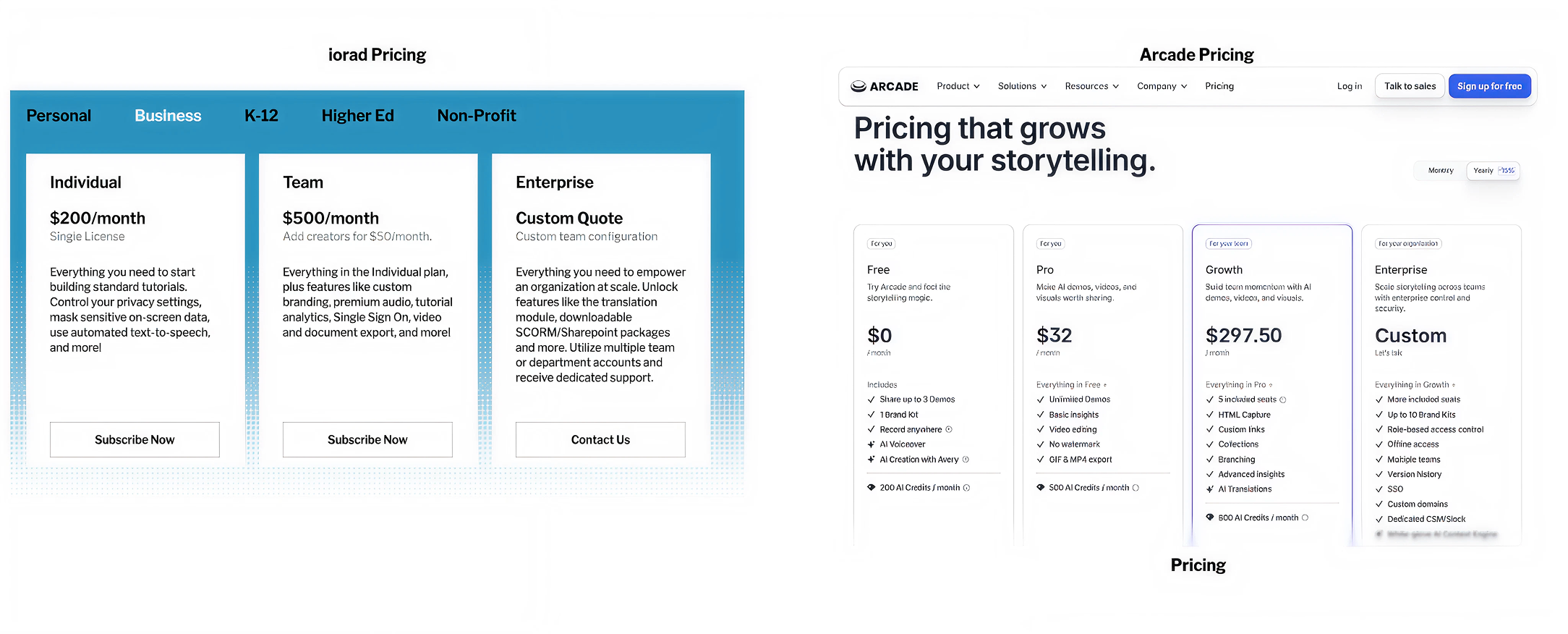
Arcade is more affordable upfront for most users. It has a free plan (limited to three demos) with limited features and a pro plan starting from $32 for individuals, while Team plans start at $292. This is more suitable for individuals, small teams, and anyone dealing with limited budget flexibility.
iorad, by contrast, starts around $200 per month for a creator license. That might seem like a big jump, but the two tools are built for very different goals.
While Arcade’s focus is showing your product through simple product demos that are quick and easy to use, iorad goes much further. It is designed for teams who are responsible for training, onboarding, enablement and knowledge sharing. It ensures training content reaches learners and does what it needs to. These features become more important as you scale - time saved handling requests, repeating instructions and sorting inconsistencies translates to revenue.
While iorad requires more of an investment, it saves hours of repeat work, minimizes manual updates, and delivers more value the more you use it. For teams that rely on documentation and training to move fast and stay aligned, the return on investment becomes obvious pretty quickly.
Final verdict
Both Arcade and iorad support customer onboarding and enablement. But the right tool depends on your priorities, the size of your team, and the specific problem you want to solve:
Choose Arcade if you:
- You need interactive product demos for prospects
- You care about visual storytelling and engagement
- You’re running a PLG or sales-led motion
- You want self-serve demos embedded in GTM channels
Arcade is good for creating first impressions and if you want users to interact with your product in a risk-free simulated environment
Choose iorad if you:
- Need structured training experiences
- Need tutorials that are clear, guided, and repeatable
- Want deeper instructional control and want to track learning efficiency
- Use case is onboarding, support, or education
- Need a tool that supports both internal training and customer enablement
iorad is a better fit where processes are more advanced, and training and documentation form part of your daily operations. If your content needs to be scalable, updatable, and actually drive behavior change, iorad gives you the structure to do that consistently.