

When it comes to documenting and sharing processes, both iorad and Scribe offer ways to help teams move faster. They take repetitive tasks like writing out instructions or recording screen shares and turn them into clean, step-by-step tutorials. That alone can be a huge time-saver.
But the similarities stop there. As your training needs grow, and your documentation shifts from one-off guides to systems that support onboarding, software rollouts, and cross-functional enablement, the tool you choose matters more. Speed, scalability, interactivity, and flexibility become critical — and that’s where the differences between iorad and Scribe start to show.
In this post, we’ll break down how each tool stacks up in the real world. Whether you’re managing live training sessions, updating help content across tools, or just trying to keep your documentation from falling out of date, this comparison will help you figure out which option is right for your team.
What both tools do well
At a foundational level, iorad and Scribe solve the same core problem. They make it easier to turn your screen activity into clear, repeatable tutorials. This is a huge win for anyone who’s tired of writing out instructions manually or explaining the same process again and again.
Here’s what both tools can help you do:
- Automatically capture your screen actions and generate tutorials
- Share those tutorials with teammates, customers, or learners
- Cut down on time spent writing or formatting documentation
- Turn day-to-day workflows into reusable knowledge assets
If your main goal is to quickly document a task and send it to someone who just needs to follow the steps, either platform will get the job done. They both simplify the creation of how-to content and remove the friction of starting from scratch.
Where things start to diverge is in how much control, depth, and scalability you need. If you’re creating a one-time guide, you might not notice much difference. But if you're responsible for maintaining up-to-date content across tools, teams, and use cases, the platform you choose can either keep up with you, or hold you back.
Where Scribe shines
Scribe’s biggest advantage is its simplicity. It’s built for users who want to capture a quick workflow, turn it into a visual guide, and share it without any extra steps. The platform focuses on speed and ease of use, which makes it especially appealing for individuals or small teams who need to move fast.
Scribe is a good fit if you:
- Need to create a one-time guide and share it quickly
- Prefer screenshot-based tutorials with overlaid text
- Want minimal setup with a clean, visual layout
- Are working with a tight budget or just starting to build documentation habits
Think of Scribe as a lightweight screenshot assistant. It takes what you’re doing on screen and turns it into a polished, visual instruction set that’s easy to share. For simple tasks like setting up an email signature, filling out a form, or walking through a static workflow, it gets the job done without much overhead.
It’s especially well suited for basic SOPs, one-off training moments, or teams that don’t need much interactivity or ongoing content updates.
Where iorad stands out
While Scribe is useful for capturing and sharing static processes, iorad takes things a step further. It doesn’t just record your clicks, it turns them into interactive, guided experiences that walk users through a process in real time. Instead of showing someone what to do, iorad lets them practice the task step by step, reinforcing understanding and building muscle memory.
This difference matters when your goal isn’t just to document a process, but to train people on how to do it accurately and confidently.
iorad is especially valuable for:
- L&D and enablement teams that are responsible for onboarding, upskilling, and rolling out complex tools
- Support teams who want to create interactive help content that reduces tickets and empowers users
- IT and operations teams who need to standardize workflows across departments without constant retraining
- Anyone managing high-change environments where processes evolve often and documentation needs to stay up to date
iorad tutorials are interactive, editable, and exportable in multiple formats. They can live inside your LMS, your knowledge base, your help desk, or even within your actual software. This flexibility allows teams to train at scale without sacrificing clarity or consistency.
If you need more than a set of screenshots, if your goal is real learning, easy updates, and content that scales with your organization, then iorad is the better long-term solution.
Here's an interactive tutorial
iorad vs. Scribe: 5 key differences that matter
Both iorad and Scribe help you turn workflows into tutorials. But the way they handle scale, interactivity, updates, and delivery makes them suited for very different types of teams. Here’s how they stack up side by side, with one clear winner in each category.
1. Interactivity vs. static walkthroughs
Scribe creates step-by-step guides using screenshots and text overlays. It’s visual and easy to follow, but it’s a read-only experience. The learner scrolls through the steps rather than practicing them.
iorad builds fully interactive walkthroughs where users click, type, and complete the actual steps in a simulation. This reinforces understanding and gives learners the chance to practice in a risk-free environment.
Winner: iorad — helps users do the task, not just read about it.
2. Speed of creation
Scribe shines when it comes to speed. You click through a process, and within seconds, it generates a clean, visual guide. For quick tasks or one-off documentation, it’s hard to beat how fast it works out of the box.
iorad is still fast, but it includes more options, like interactivity and export settings which adds a few extra steps to set up. That flexibility is valuable, but it may feel like overkill for super simple use cases.
Winner: Scribe — the fastest way to create a polished how-to in under a minute.
3. Updating and maintaining tutorials
Scribe tutorials are image-based and static. If a step changes, you’ll likely need to recreate the entire guide from scratch.
iorad tutorials are modular. You can swap a step, update a screenshot, or tweak instructions without starting over. This is critical when dealing with evolving tools or high-change environments.
Winner: iorad — future-proofs your documentation without rework.
4. Format flexibility
Scribe offers sharing via direct link, PDF export, or embedding into documentation pages. It’s clean and accessible, but mostly geared toward static viewing.
iorad supports multiple formats — interactive embed, step-by-step article, SCORM for LMS, PDF, and even video. This allows you to reuse the same content across platforms and learning channels without reformatting.
Winner: iorad — delivers the same tutorial in whatever format your team needs.
5. Scalability across teams and tools
Scribe is great for individuals or small teams creating one-off SOPs or quick visual guides. But as the number of tools, teams, and workflows increases, it becomes harder to manage everything in one place.
iorad is built for scale. It supports team permissions, versioning, centralized libraries, and integrations with help desks, knowledge bases, and internal systems. It’s used by universities, enterprises, and high-growth companies to standardize learning across departments.
Winner: iorad — grows with your team and adapts to your stack.
What about pricing?
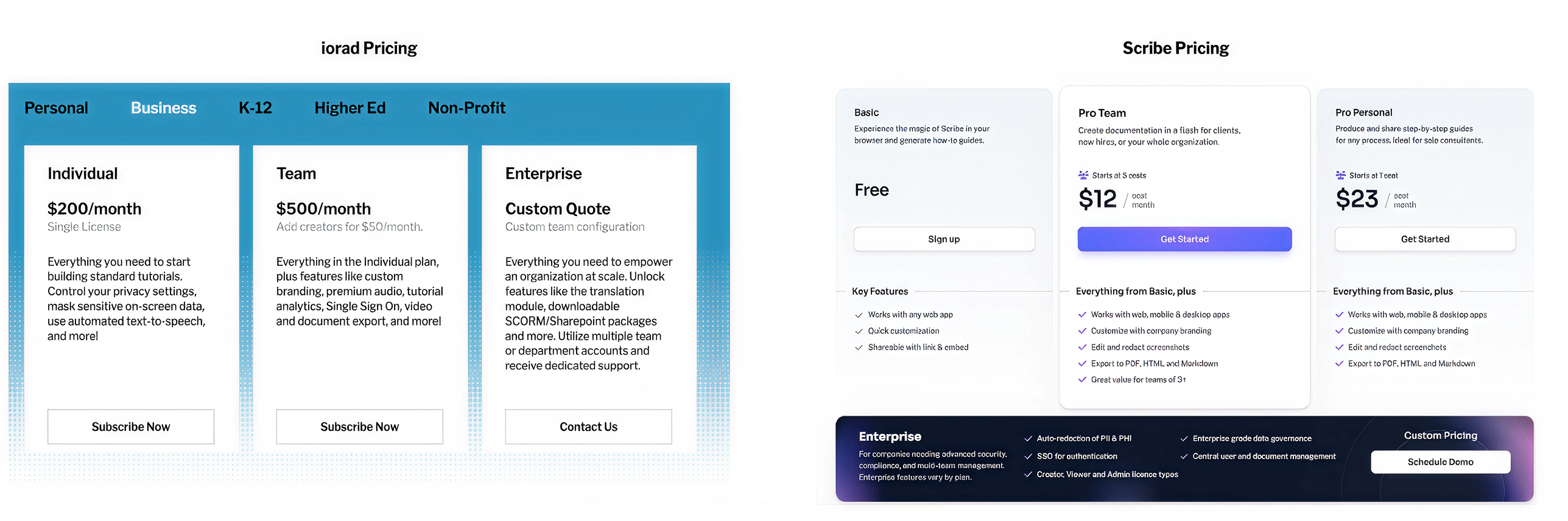
It’s true that Scribe is more affordable upfront. Their basic plan starts at around $12 per user per month, which makes it a popular option for individuals, small teams, or anyone just starting out with documentation.
In contrast, iorad’s pricing starts around $200 per month for a creator license. That might seem like a big jump, but the two tools are built for very different goals.
Scribe is great if you need a lightweight, budget-friendly way to create visual guides once in a while. It’s fast, accessible, and gets the job done for simple, static workflows.
iorad, on the other hand, is designed for teams where training, onboarding, and knowledge sharing are core responsibilities. It supports multiple formats, integrates across platforms, enables modular editing, and provides interactive, reusable content that scales. These aren’t just nice-to-have features, they’re essential when you’re trying to reduce support requests, speed up onboarding, or maintain consistency across growing teams.
While iorad requires more of an investment, it saves hours of repeat work, minimizes manual updates, and delivers more value the more you use it. For teams that rely on documentation and training to move fast and stay aligned, the return on investment becomes obvious pretty quickly.
Final verdict
Both iorad and Scribe help you get out of the habit of writing repetitive instructions by hand. But the right tool for you depends on the depth of your needs, the scale of your team, and how central training is to your workflow.
Choose Scribe if you:
- Want the simplest way to create a quick visual guide and share it instantly
- Have lightweight documentation needs or work as a solo contributor
- Prioritize speed and cost-efficiency over customization and interactivity
- Are focused on creating static SOPs or showing simple click paths
Scribe is a great choice when you need something fast, visual, and easy to maintain for smaller-scale documentation.
Choose iorad if you:
- Need tutorials that go beyond visuals and actually let users interact step by step
- Want to be able to edit and update tutorials as processes change, without starting over
- Support cross-functional training across multiple tools, departments, or platforms
- Need one system that integrates with your LMS, help desk, Slack, Confluence, and more
iorad is a better fit when training and documentation are part of your team’s daily operations. If your content needs to be scalable, updatable, and actually drive behavior change, iorad gives you the structure to do that consistently.