

Walk into almost any organization today and you’ll see the same pattern.
Software training is delivered through webinars, onboarding cohorts, live workshops, and internal walkthrough sessions. A subject matter expert schedules time, shares their screen, walks through a process, answers questions, and then moves on.
It feels natural. Familiar. Easy to organize.
But it is also deeply inefficient.
The way most organizations teach software today was not designed for how software actually works. And as a result, companies are spending far more time, money, and effort on training than they realize.
If you are teaching software through repeated live sessions, you are likely using the most expensive and least scalable training model available.
The Current State of Corporate Training
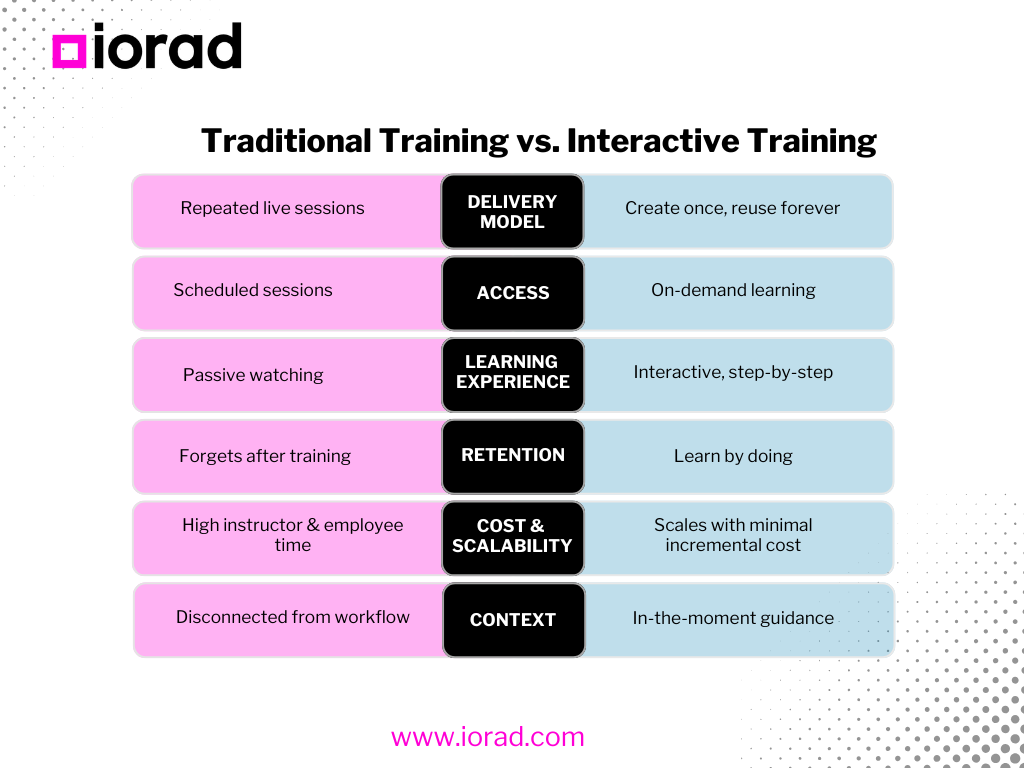
Most corporate training models were built for a different era.
They were designed for:
- classroom environments
- static knowledge transfer
- one-time learning events
In that context, instructor-led training made sense. You gather people in a room, deliver information, and expect them to apply it later.
But modern organizations operate very differently.
Teams are:
- distributed across locations
- working with constantly evolving tools
- expected to learn and adapt quickly
Despite this, the training model has not evolved.
Organizations still rely on:
- live onboarding sessions
- recurring webinars
- internal walkthroughs
- scheduled training cohorts
This creates a system where learning is tied to events rather than embedded into the work itself.
At first glance, this seems manageable. But when applied to software workflows, the limitations become clear.
Why Live Training Fails for Software Workflows
Software is not something you learn once.
It is something you use repeatedly, often in complex and changing contexts.
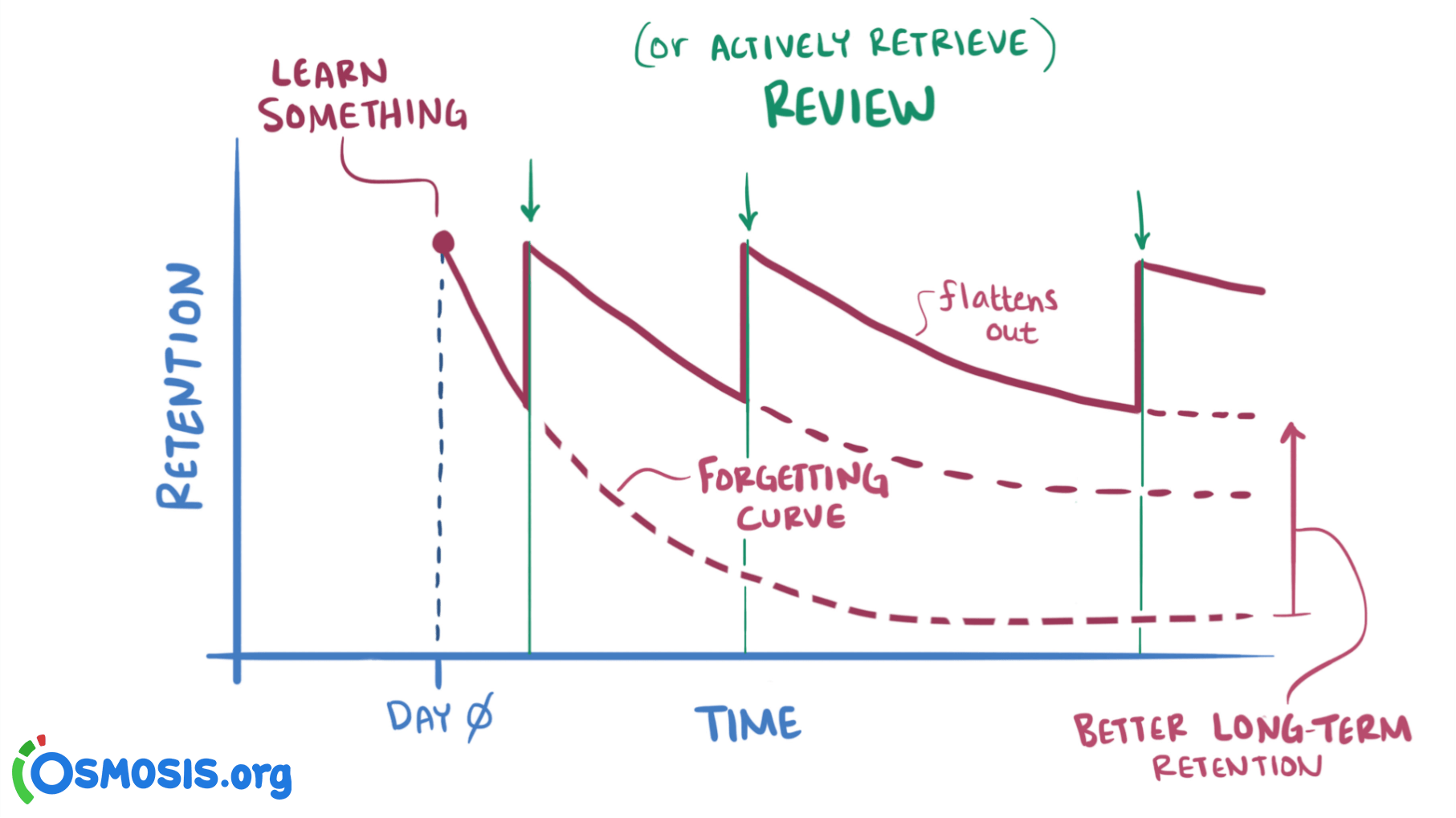
(Source: osmosis.org)
Learning software effectively requires:
- step-by-step execution
- repetition
- contextual understanding
- access at the moment of need
Live training struggles to deliver any of these consistently.
1. Learning is passive
In most live sessions, learners watch someone else perform a task.
They see clicks. They hear explanations. They try to follow along.
But they are not actively doing the work themselves in a structured way.
Research shows that passive learning leads to low retention. Learners can forget up to 50–70% of information within 24 hours.
Without immediate application, most of what is taught simply disappears.
2. There is no repetition when it matters
The real moment of learning does not happen during the training session.
It happens later, when a user is inside the tool trying to complete a task.
At that moment, they need guidance.
But live training happens before that moment. By the time users need the knowledge, it is no longer accessible.
This forces them to:
- guess
- ask a colleague
- wait for help
- or request another training session
3. Scheduling slows down learning
Live training is constrained by calendars.
Every session requires:
- coordination
- availability
- attendance
This creates friction.
Instead of learning when they need to, employees must wait for the next scheduled session. This delays onboarding, slows adoption, and reduces productivity.
4. Instructors repeat the same work endlessly
One of the most overlooked inefficiencies is repetition.
The same workflows are:
- explained again
- demonstrated again
- answered again
Every new hire, every new team, every new customer requires the same session to be delivered again.
This creates a cycle:
Teach → Repeat → Teach → Repeat
Over time, subject matter experts spend a significant portion of their time delivering the same content instead of focusing on higher-value work.
5. Training does not produce reusable assets
When a live session ends, very little remains.
There may be:
- a recording (rarely used)
- notes (often incomplete)
- slides (detached from execution)
But there is no structured, step-by-step learning asset that can be reused.
This means training is not cumulative. It does not improve over time. It simply repeats.
The Real Cost of Virtual Instructor-Led Training
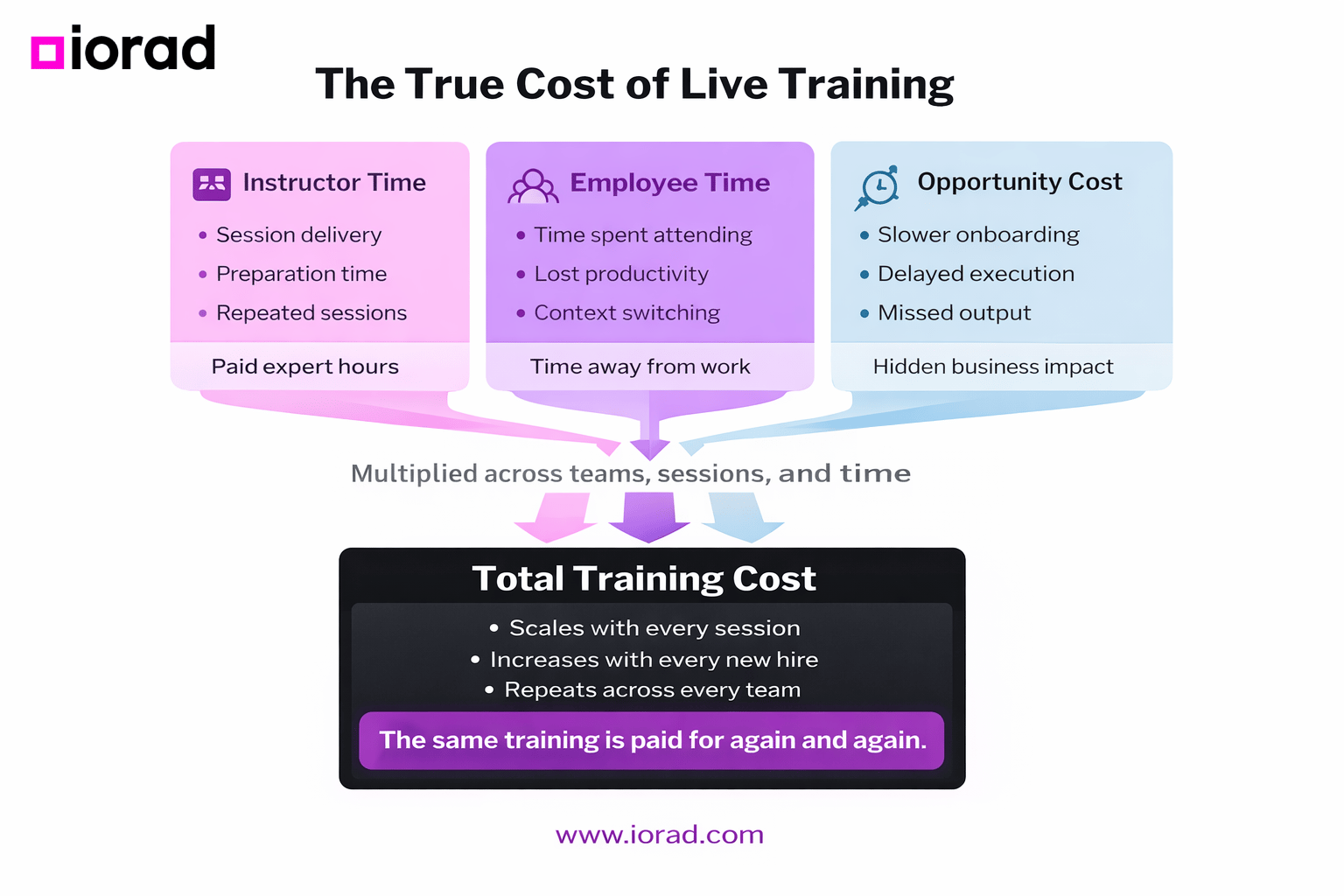
The cost of live training is not always obvious because it is spread across multiple areas.
But when you break it down, the impact is significant.
Instructor cost
Consider a simple example:
- A 2-hour training session
- Delivered 10 times per month
- Instructor hourly cost: $80
That results in:
2 × 10 × 80 = $1,600 per month
And that is just for one workflow.
Multiply that across multiple processes, tools, and teams, and the cost increases quickly.
Employee time cost
Now consider the learners.
If 20 employees attend a 2-hour session and their average hourly rate is $40:
20 × 2 × 40 = $1,600 per session
Across 10 sessions per month:
$1,600 × 10 = $16,000 per month
This is time that employees are not spending on productive work.
Opportunity cost
Beyond direct costs, there is an even larger hidden cost.
Time spent in training is time not spent:
- closing deals
- serving customers
- building products
- executing core responsibilities
This opportunity cost is rarely measured, but it often exceeds the visible cost of training itself.
The repetition multiplier
The most expensive part of live training is repetition.
Every time training is delivered again, the cost resets.
New hires require onboarding. Teams require refreshers. Customers require education.
The same content is delivered over and over again, creating a compounding cost that grows with the organization.

A Better Way: The Interactive Training Model
The fundamental problem with live training is not that it exists. It is that it is being used for the wrong purpose.
Instead of repeating training, organizations should capture it once and reuse it indefinitely.
This is where interactive tutorials come in.
Capture workflows once
Interactive tutorials allow organizations to record a process as it happens. Each step is captured and turned into a guided experience.
Instead of watching someone perform a task, learners are guided through it themselves.
Interactice tutorial example:
Enable self-serve learning
With interactive tutorials, learners can:
- access training anytime
- learn at their own pace
- revisit content as needed
This removes the dependency on scheduling and allows learning to happen exactly when it is needed.
Provide step-by-step guidance
Interactive tutorials break workflows into clear, actionable steps.
This reduces cognitive load and helps users focus on execution rather than memorization.
Instead of trying to remember what was shown in a session, users are guided through the process in real time.
Scale infinitely
Once created, a tutorial can be used by:
- one person
- one hundred people
- thousands of people
There is no additional cost per learner.
This transforms training from a linear cost model into a scalable system.
Free up instructors for high-value work
In the interactive model, instructors are no longer responsible for repeating basic workflows.
Instead, their time is focused on:
- answering complex questions
- handling edge cases
- providing strategic guidance
This is where human expertise delivers the most value.
The Core Content + Office Hours Model
The most effective training systems combine two elements.
Core content
This is the foundation.
Interactive tutorials that teach:
- repeatable workflows
- standard processes
- system navigation
These tutorials handle the majority of training needs.
Office hours
Live sessions are still valuable, but their role changes.
Instead of covering basic workflows, they focus on:
- advanced use cases
- problem solving
- discussion
- contextual application
This creates a more efficient use of time for both instructors and learners.
From Training Events to Training Systems
The shift from live training to interactive learning is not just a tactical change.
It is a structural shift.
Traditional model
Instructor → Webinar → Learners
- training is event-based
- knowledge is temporary
- cost scales with delivery
Interactive model
Tutorial → Self-Serve Learning → Office Hours
- training is system-based
- knowledge is persistent
- cost scales efficiently
Why This Matters Now
As organizations grow, the limitations of live training become more pronounced.
More employees means:
- more sessions
- more repetition
- more cost
More complexity means:
- more workflows
- more edge cases
- more confusion
Without a scalable training system, these challenges compound over time.
Interactive tutorials address this by turning training into an asset rather than an activity.
Conclusion
If you are teaching software through repeated live sessions, you are investing heavily in a model that does not scale.
You are:
- spending more time than necessary
- creating bottlenecks in learning
- limiting how effectively your teams can adopt tools
The alternative is not to eliminate live training entirely.
It is to use it where it matters most.
Capture repeatable workflows once. Deliver them through interactive tutorials. Allow learners to access training when they need it.
Then use live sessions for what humans do best: answering questions, solving problems, and providing insight.
The future of training is not more sessions.
It is fewer sessions, better content, and smarter use of human time.