

A practical guide for IT, security, and InfoSec teams
If your team has been asked to approve or support the use of iorad, it makes sense to pause and take a closer look.
What exactly is this tool? How is it being used? Where could risk show up? And what controls need to be in place to make sure employees are not accidentally capturing or sharing personally identifiable information or other sensitive data?
Those are the right questions. In most organizations, security and IT teams are expected to think this way. When a new tool is introduced, especially one that captures on-screen workflows, the concern is not hypothetical. If someone records the wrong thing or shares the wrong output, sensitive data can end up in places it should not be.
That is exactly why we put together a PII prevention control plan and per-tutorial worksheet. This article walks through that framework in plain terms so it can be evaluated, adapted, or implemented by your team. The full version of the control plan is embedded below and can be used directly as a reference or starting point.
What iorad is, through a security lens
iorad is used to create step-by-step tutorials of software workflows. Teams use it for internal documentation, training, customer education, and process enablement.
From a security standpoint, the important detail is how those tutorials are created. Because content is captured from real screens, the risk is not the tool itself. The risk is whether sensitive data appears during capture or remains visible in the final output.
That shifts the conversation from tool approval to process control.
Where risk actually shows up
Most exposure risk does not come from obvious mistakes. It tends to show up in small, overlooked places:
- A real customer name in a dropdown
- A visible email or phone number
- A browser tab with internal tools open
- A hidden panel exposing account data
- A transcript capturing unintended text
- A link or asset that includes sensitive context
The control plan is designed to address these exact scenarios, not just the obvious ones.
The control framework at a glance
At its core, the model is intentionally simple. It focuses on two controls that eliminate the majority of risk:

The framework above is intentionally simple, but for security and IT teams, the question is always the same: how is this enforced in practice?
Here is a complete PII prevention control plan and per-tutorial worksheet. This is the exact structure teams use to operationalize these controls, assign ownership, and maintain audit-ready evidence.
How the process works in practice
Rather than relying on policy alone, this framework is designed to be operational. Below is how it typically plays out across a single tutorial lifecycle.
Step 1: Choose the right environment before recording
The most important decision happens before anything is captured.
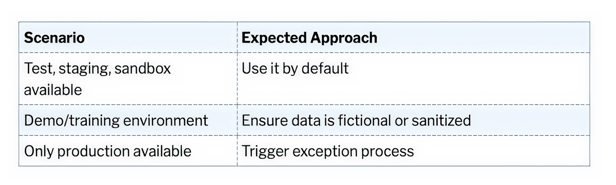
The guiding principle is simple:
If a safe environment exists, it should be used.
This eliminates the majority of downstream risk.
Step 2: Creator performs a pre-recording check
Even in non-production environments, risk can still exist if data is not properly sanitized.
Before recording, the creator is expected to confirm:
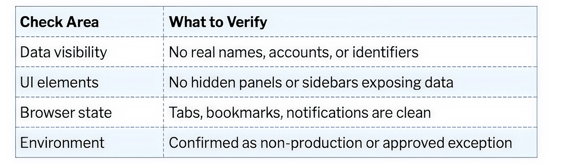
This step is lightweight, but critical. It pushes responsibility to the moment where risk is easiest to control.
Step 3: Creation with controlled exposure
During recording, the expectation is not perfection. It is awareness.
Creators should:
- Limit screen exposure to what is necessary
- Avoid unnecessary navigation across systems
- Be mindful of peripheral elements (tabs, alerts, panels)
If production is used, exposure should be minimized and documented as part of the exception process.
Step 4: Creator self-check before submission
Before handing off for review, the creator performs a quick scan of the content.
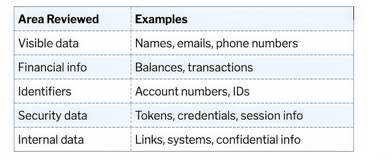
This is not the final gate. It is the first pass to catch obvious issues early.
Step 5: Independent second-person review
This is the most important control in the entire process.
No tutorial is published or shared until it is reviewed by someone other than the creator.
The reviewer is responsible for validating that nothing sensitive is exposed anywhere in the content.
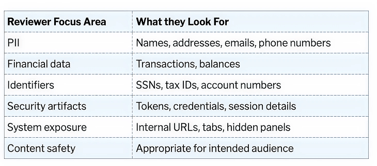
If anything is found, the process is clear:
- Reject
- Remediate
- Re-review before approval
Step 6: Exception handling for production use
Production use is not prohibited, but it is controlled.
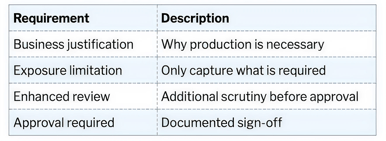
If real client data appears, the content must be remade or corrected before release.
Step 7: Documentation and evidence retention
From an InfoSec perspective, this is what makes the process defensible.
Each tutorial should have a simple record that includes:
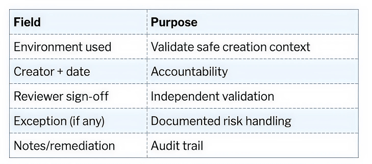
The guide recommends retaining this alongside the tutorial record in accordance with internal policies.
Roles and ownership
One of the strengths of this model is that responsibility is clearly defined.
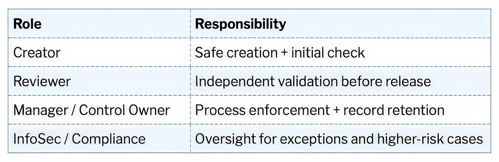
This keeps security involved where it matters most, without requiring them to review every piece of content.
Why this approach tends to get approved
From a security standpoint, this framework works because it aligns with how risk is typically managed elsewhere:
- It reduces exposure at the source
- It introduces a clear review checkpoint
- It defines ownership and accountability
- It produces auditable evidence
- It allows for controlled exceptions rather than blocking workflows
It is not trying to eliminate all risk through restriction. It is managing risk through structure.
Using this with your team
If you are on the business side, this is meant to be shared directly with your IT or InfoSec team as part of your rollout plan.
If you are reviewing this from a technical or security perspective, the intention is not to replace your internal policies. It is to provide a practical baseline that can be adapted to your existing controls.
The full control plan and worksheet are available below and can be used as-is or modified to fit your environment.
Final thought
Most tools are not inherently risky or safe. The difference comes down to how they are used.
With the right controls in place, iorad can be rolled out in a way that supports documentation and enablement without introducing unnecessary exposure.
This framework is designed to make that possible in a way that is simple, enforceable, and aligned with how security teams already think.