

How modern Learning & Enablement teams turn SMEs into a scalable content engine without slowing them down
Most organizations don’t realize they’ve built a system where SMEs are unintentionally treated like part-time instructional designers.
The signs are easy to spot:
- Endless back-and-forth meetings
- Storyboards that require rewriting
- Outdated training because the system changed mid-project
- Content stuck with Learning/because the SME “hasn’t had time to review”
- Launches slowed by documentation debt
No one designed it this way.
It simply happens when companies grow faster than their training infrastructure.
Yet in mature Learning & Enablement teams, something different is happening.
They’ve realized that SME bottlenecks aren’t a people problem. They’re a systems problem.
And when you redesign the system, you unlock what Border States experienced — a 5x improvement in SME efficiency, cutting content creation from 48 hours down to 9 hours while improving quality.
That full story is here in this clip with Sara Madsen:
This guide breaks down the exact approach so you can deploy the same model inside your company.
1. Redefine the SME’s actual job-to-be-done
Most Learning & Enablement teams accidentally ask SMEs to:
- Teach the workflow
- Help design the learning experience
- Capture screenshots
- Review drafts
- Approve storyboards
- Re-record when the UI changes
That’s not fair. And it’s not scalable.
Here’s the corrected model:
SME = Source of Truth
They know the workflow, exceptions, and what “good” looks like.
Learning = System of Truth
They know how to turn raw workflow expertise into scalable training.
The SME’s real job?
Perform the workflow once in the real system. Not build the content. Show the content.
When you anchor the model here, everything downstream gets easier.
2. Selling the Real Value to SMEs: How Documentation Buys Back Their Time
Most resistance from SMEs is not about unwillingness. It is about pattern recognition. SMEs have learned that “helping with documentation” usually turns into more meetings, more reviews, and more follow-up questions. From their perspective, it feels like extra work layered on top of an already full job.
That is why modern Learning & Enablement teams start by reframing the story. The goal of SME collaboration is not better documentation. It is fewer interruptions. When positioned correctly, documentation becomes an exchange: a small, focused investment upfront in return for long-term relief from one-off questions, recurring meetings, and constant Slack pings.
The reality is that SMEs are already teaching every day. The cost is just hidden and fragmented.
They are already:
- Explaining the same workflow in multiple meetings
- Answering identical questions in Slack and email
- Getting pulled into “quick calls” that interrupt deep work
- Acting as the escalation point when something breaks or changes
None of this effort compounds. It disappears the moment the conversation ends.
Capturing a workflow once in the real system turns that invisible teaching into something reusable. Instead of answering the same question ten times, the SME answers it once and redirects people to the source of truth. Over time, that single capture replaces dozens of interruptions.
This is the value Learning & Enablement needs to sell.
When a workflow is documented correctly:
- New hires self-serve instead of booking time
- Support teams stop escalating basic questions
- Managers stop pulling SMEs into ad hoc walkthroughs
- Slack threads turn into links instead of explanations
The SME’s role shifts from constant responder to occasional advisor. The work does not increase. It concentrates, and then it disappears.
For this promise to be believable, one rule matters more than any tool or process:
Captured workflows must actually replace live explanations.
That means teams must normalize linking tutorials instead of scheduling calls. Managers must point people to documentation instead of the SME. Learning & Enablement must publish quickly so content stays current. When this loop works even once, trust accelerates fast. SMEs see that this is not extra work. It is leverage.
This mindset shift is what allows Learning & Enablement teams to scale content creation without scaling burnout. The rest of this guide shows exactly how to operationalize that promise.
3. Identify the workflows worth capturing
Not everything requires SME time. Focus only on high-impact workflows.
Here’s a simple Workflow Coverage Map you can use:
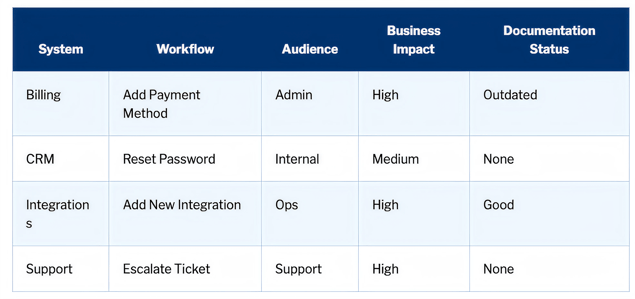
Ask these questions:
- Where are misunderstandings or mistakes causing real impact?
- Where do support teams repeatedly answer the same questions?
- Which workflows support revenue, compliance, or safety?
- Which workflows will change in the next quarter?
This map becomes your prioritized SME backlog.
4. Give SMEs a frictionless way to “just do the work”
This is where the entire system transforms.
The winning model is simple:
- SME performs the workflow normally.
- A capture tool records steps automatically.
- The system generates a structured tutorial.
- Learning & Enablement makes small edits and publishes.
See this workflow in action:
This eliminates:
- Manual screenshotting
- Long working sessions
- Rewrites
- “We’ll redo this when the workflow stabilizes” delays
And it gives SMEs their most valuable experience:
They teach once, and never have to touch it again unless the workflow changes.
This is exactly how Border States reduced content creation from 48 hours → 9 hours.
5. The SME Quickstart Kit (copy/paste)
Give SMEs this exact 1-page handout:
Your role:
Help us document this workflow by performing it exactly as you would teach a new colleague.
What you’ll do
- Open the real system
- Walk through the workflow slowly and clearly
- Narrate key decisions or warnings
- Use realistic sample data
- Call out exceptions (“If X happens, do Y…”)
What you will not do
- No storyboards
- No screenshots
- No rewriting
- No editing
- No formatting
- No long reviews
Capture Script (read this out loud if you want)
“Today I’m going to walk through how to [WORKFLOW].
I’ll show you the steps I take, what to watch for, and any exceptions we commonly run into.”
Naming template
Product – Workflow – Role – Version
Examples:
Billing – Refund Invoice – Admin – v1
CRM – Reset Password – Tier 1 – v2
Where to submit your tutorial
- Link to intake form
- Or Slack channel (see rollout template below)
- Or folder upload
Hand this to SMEs before any capture session.
It dramatically reduces misunderstandings and speeds up the handoff.
6. Learning & Enablement Handoff Workflow: Capture → Review → Publish
Once the workflow is captured, L&D takes over.
Here’s the tactical flow:
Phase 1: Capture
- SMEs perform workflow
- Tool generates steps, screenshots, interactions
- SME submits the captured flow via the intake system
Phase 2: Review & Editing (Learning & Enablement)
Editing pass:
- Tighten language
- Remove internal jargon
- Add missing context
- Highlight warnings
- Clarify optional vs required steps
Quality checklist:
- Steps follow a clean verb-first format
- Screenshots match updated UI
- Flow follows “happy path” + known exceptions
- No dead ends or confusing loops
- Uses role-appropriate language
- Has clear naming
Phase 3: Publish & Distribute
You should publish tutorials to:
- Academy/LMS
- Knowledge base
- In-app help
- Onboarding docs
- Ops/enablement libraries
- Support macros
- Regional guides
- Customer or partner training
This is where one source of truth creates massive scale.
7. Build an Intake System That Makes Submission Effortless
Directly from your PDF — here is the intake table formatted for a HubSpot landing page:
TUTORIAL INTAKE SYSTEM
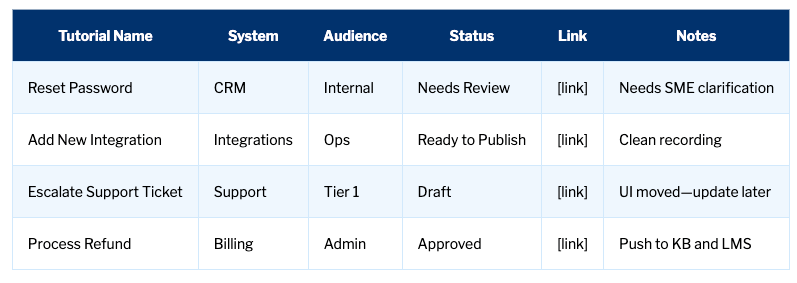
Statuses:
- Draft
- Needs Review
- Ready to Publish
- Approved
- Published
This gives SMEs a clear pipeline.
It also gives L&D visibility into workload, priorities, and content gaps.
8. Rollout Template for Slack or Teams
Teams love having a simple, visible place to drop tutorials.
Your PDF included this — here it is optimized:
CHANNEL ANNOUNCEMENT TEMPLATE
Welcome to the SME Tutorial Submission channel!
If you complete a workflow that should be documented, simply:
- Capture it using the Quickstart Kit
- Drop your tutorial link here
- Tag @L&D for review
This channel helps us:
- Free up SME time
- Reduce repetitive questions
- Keep content accurate
- Speed up adoption across the company
Thank you for helping us build our internal knowledge engine!
This creates a culture of contribution without adding friction.
9. Gamify contributions to build momentum
These incentives were in your PDF and they’re powerful:
Gamification Ideas
- “Record Your First Tutorial Day”
- Tutorial of the Month award
- Quarterly leaderboard
- Gift cards for highest impact tutorial
- Swag for “Most Helpful SME”
- Shoutouts in all-hands
Gamification drives behavior long before documentation becomes habit.
10. The Success Formula: SMEs + L&D + Tooling
Here is the system, simplified:
- SME performs workflow →
- System captures automatically →
- L&D edits for clarity →
- Content gets reused everywhere →
- Updates cascade from a single master source
This is the model used by modern L&D teams scaling tech adoption.
Across hundreds of teams using this approach, the outcomes are consistent:
- Faster implementations
- Fewer meetings
- Better quality training
- Reduced support load
- Higher adoption
- Lower SME burnout
This is the same model that helped Border States achieve a 5x improvement in efficiency.
11. Summary Checklist (Copy/Paste)
Here’s the entire program in one bite-size list:
- Define SME role (performer, not content creator)
- Build a workflow coverage map
- Deploy the SME Quickstart Kit
- Use a capture-first system
- Create intake + review pipeline
- Publish one tutorial, reuse everywhere
- Put governance + naming standards in place
- Add light gamification
- Track ROI (SME hours saved, L&D hours saved)
- Communicate wins to leadership
If you run these steps, you will eliminate 80 percent of the friction in your SME workflow.
Want more Digital Adoption guides and content like this? Subscribe to:
Our podcast & Newsletter - The Adoption Curve: